


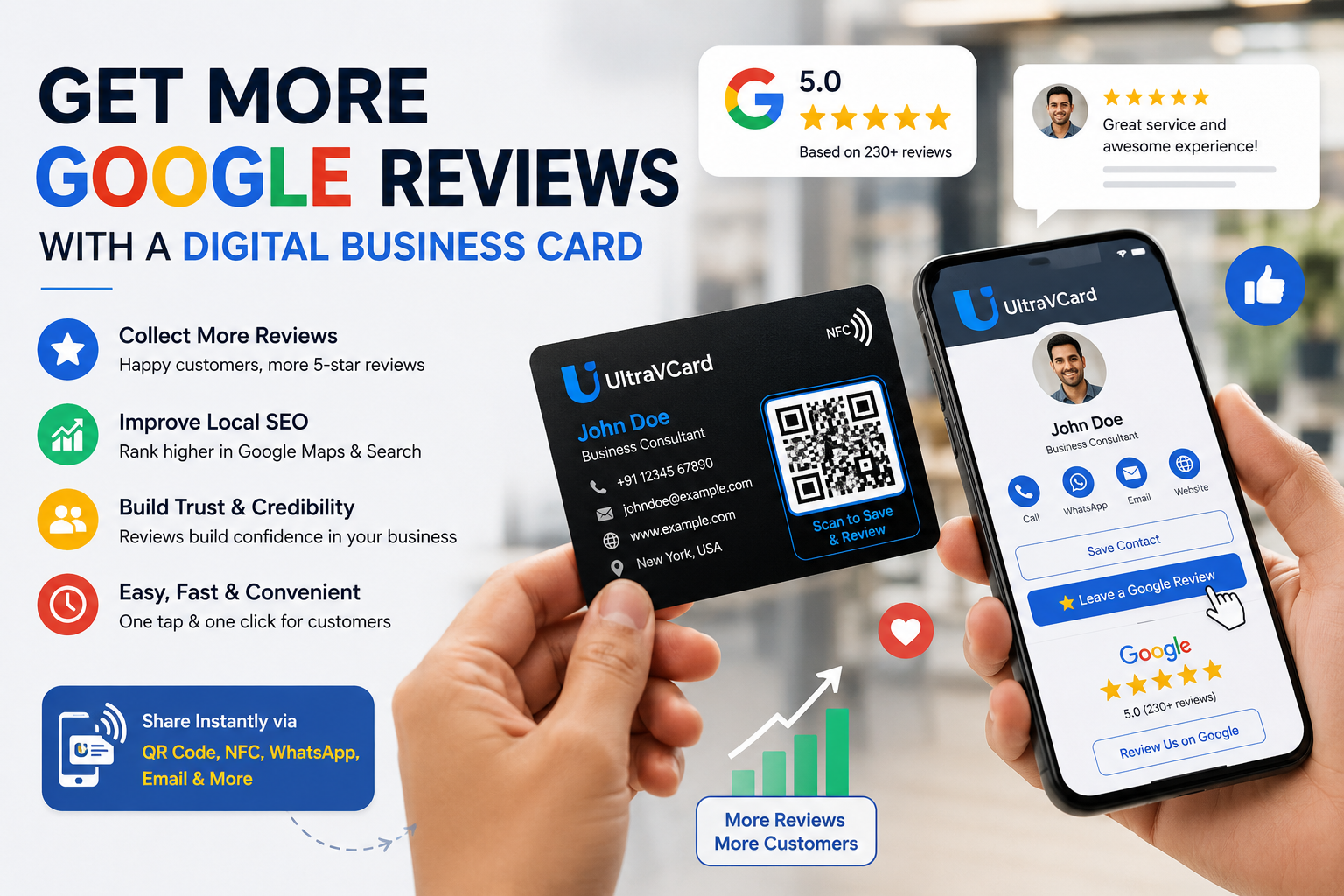
Google Reviews have become one of the most influential factors in determining whether customers choose your business or your competitors. Before purchasing a product, booking a service, or visiting a local store, people often search on Google to see what others have said about their experience. Businesses with a high number of positive reviews are generally viewed as more trustworthy, reliable, and professional.
Whether you own a restaurant, salon, retail shop, clinic, real estate agency, digital printing business, or work as a freelancer, Google Reviews can significantly impact your online visibility and customer confidence. In fact, businesses with more positive reviews often appear higher in Google Maps and local search results, helping them attract more customers without spending extra money on advertising.
The challenge, however, is that many satisfied customers never leave a review. Not because they had a bad experience, but because the process takes too much time. They may forget later, get busy, or simply not know how to find your Google Business Profile.
This is where a Digital Business Card becomes a powerful marketing tool.
Instead of asking customers to search for your business manually, a digital business card provides a direct "Leave a Google Review" button. Customers can simply scan a QR code, tap an NFC business card, or open a shared link to access your profile instantly. This removes unnecessary steps and makes it much easier for customers to share their feedback.
In this guide, you'll learn how digital business cards help businesses collect more Google Reviews, improve local SEO, strengthen customer trust, and ultimately grow their business.
Google Reviews are much more than just star ratings. They influence how potential customers perceive your business and play an important role in local search engine optimization (Local SEO).
Imagine you're searching for a nearby coffee shop. Two businesses appear in the search results:
Most people naturally choose Coffee Shop A because it appears more reliable and popular.
The same applies to almost every industry. Customers often compare businesses based on reviews before making a purchase or booking a service.
Positive Google Reviews can help your business:
Google also considers review quality, quantity, and freshness when determining local search rankings. Businesses that consistently receive genuine customer feedback often perform better in local search results than businesses with very few reviews.
For small businesses, collecting positive reviews is one of the most cost-effective ways to attract new customers.
A digital business card is a modern alternative to a traditional paper business card. Instead of sharing only your name and phone number, it allows you to provide a complete online profile that customers can access instantly using a web link, QR code, or NFC-enabled business card.
Unlike printed business cards, digital business cards can include:
This transforms a simple business card into a complete digital profile that not only helps customers contact you but also encourages them to engage with your business and leave valuable feedback.
One of the biggest advantages of a digital business card is that it can be updated anytime. If your phone number, address, website, or services change, you only need to update your digital profile. Every customer who accesses your card will always see the latest information without the need to print new cards.
Collecting Google Reviews doesn't have to be difficult. Most customers are willing to leave a review after a positive experience, but they often need a simple and convenient way to do it. A digital business card removes unnecessary steps and makes the review process fast, easy, and accessible.
Instead of asking customers to search for your business manually, you can guide them directly to your Google Review page with a single tap or scan. This convenience increases the likelihood that customers will complete the review while their experience is still fresh.
Let's explore how digital business cards make this possible.
One of the biggest reasons customers don't leave reviews is because the process takes too many steps. They need to search for your business, find the correct listing, click on the reviews section, and then write their feedback.
A digital business card simplifies this journey by including a dedicated "Leave a Google Review" button.
When customers click this button, they are taken directly to your Google Business Profile's review page. There is no searching, no confusion, and no wasted time. The easier the process, the more reviews your business is likely to receive.
Timing is one of the most important factors in collecting positive reviews.
The best moment to ask for a review is immediately after you've provided excellent service. At that point, the customer's experience is fresh in their mind, and they are more likely to share their feedback.
For example, you can ask for a review after:
Instead of verbally explaining how to find your business on Google, simply share your digital business card through WhatsApp, SMS, email, or by letting the customer scan a QR code.
This small change can dramatically improve your review collection rate.
QR codes have become a familiar part of everyday life. Customers use them to make payments, view restaurant menus, and access websites. The same technology can help you collect more Google Reviews.
Your digital business card includes a QR code that customers can scan using their smartphone camera. Once scanned, they are taken directly to your digital profile, where they can access your Google Review button.
You can place this QR code on:
Every interaction becomes an opportunity to receive valuable customer feedback.
Near Field Communication (NFC) technology takes convenience one step further.
With an NFC business card, customers don't even need to scan a QR code. They simply tap your NFC card against a compatible smartphone, and your digital business card opens automatically in their web browser.
Within seconds, they can:
Because the process is so quick and effortless, NFC business cards often result in higher customer engagement.
Another advantage of digital business cards is their flexibility. You are not limited to face-to-face interactions.
You can send your digital business card through:
For example, after completing an online order, you can send a thank-you message with your digital business card and politely ask the customer to share their experience on Google.
This approach feels professional, provides value, and makes leaving a review incredibly simple.
A digital business card is much more than a review collection tool. It serves as a complete online profile where customers can learn about your business before deciding to leave feedback.
Your card can include:
When customers see a professional and well-organized profile, they are more confident in your business. This increased trust often leads to more positive reviews and stronger long-term customer relationships.
Simply having a Google Review button on your digital business card isn't enough. The way you ask for reviews and the experience you provide to customers also plays a major role in encouraging them to leave positive feedback.
Here are some proven strategies that can help your business collect more authentic Google Reviews.
The foundation of every positive review is excellent customer service. Even the best digital tools cannot replace a great customer experience.
Focus on:
Happy customers are naturally more willing to recommend your business and leave positive reviews.
Many businesses hesitate to ask for reviews because they fear annoying customers. In reality, most satisfied customers are happy to leave feedback when asked politely.
Instead of saying:
"Please give us a five-star review."
Try saying:
"Thank you for choosing our business. If you were happy with our service, we'd really appreciate it if you could share your experience by leaving us a Google Review."
A friendly request feels natural and professional.
Customers are more likely to leave a review when the process takes less than a minute.
Your digital business card should include a clear "Leave a Google Review" button that opens your Google Business Profile directly.
Avoid asking customers to:
The fewer steps involved, the higher your review conversion rate.
Not every customer will leave a review immediately. A polite follow-up message can significantly improve response rates.
For example, after completing an order, you can send a WhatsApp or email message such as:
"Thank you for choosing our business! We hope you enjoyed your experience. We'd love to hear your feedback. You can leave us a Google Review here:"
Include your UltraVCard digital business card link so customers can access your review page with one click.
Many businesses focus only on collecting reviews but forget to respond to them.
Replying to reviews shows that you genuinely care about customer feedback.
When responding:
Professional responses build trust not only with the reviewer but also with future customers who read your reviews.
Collecting Google Reviews is important, but certain practices can actually harm your online reputation. Here are some common mistakes to avoid.
Purchasing fake reviews or asking people who have never used your service to leave feedback violates Google's policies.
Fake reviews can:
Always focus on earning genuine reviews from real customers.
The best time to request a review is immediately after a successful interaction.
If you wait several days or weeks, customers may forget important details or lose motivation to leave feedback.
A digital business card allows you to ask for reviews instantly while the positive experience is still fresh.
No business is perfect. Occasionally, you may receive negative feedback.
Instead of ignoring it, use it as an opportunity to improve.
Respond calmly, thank the customer for sharing their concerns, and explain how you plan to resolve the issue. A thoughtful response can often turn a dissatisfied customer into a loyal one.
If your phone number, business address, or website changes, make sure your digital business card is updated immediately.
Accurate information helps customers contact you easily and builds confidence in your business.
Google Reviews don't just influence customer decisions—they also play an important role in Local SEO.
When people search for services such as:
Google uses several factors to decide which businesses appear in the local search results.
Customer reviews contribute by helping Google understand:
Businesses that consistently receive genuine, positive reviews often enjoy better visibility in Google Maps and local search listings.
Combined with a complete Google Business Profile and a professional digital business card, customer reviews become a powerful strategy for attracting more local customers.
Imagine two digital printing shops in the same city.
Shop A
Shop B
Which shop do you think new customers are more likely to choose?
Most people will naturally trust Shop A because its strong review profile demonstrates consistent customer satisfaction.
This example shows how combining excellent service with a digital business card can help businesses build credibility, improve local SEO, and attract more customers over time.
A digital business card is more than just a modern replacement for a paper business card—it's a powerful marketing tool that helps businesses connect with customers, strengthen their online presence, and generate more opportunities.
UltraVCard is designed to make networking simple, professional, and effective. Whether you're a freelancer, entrepreneur, doctor, consultant, retailer, or small business owner, UltraVCard provides everything you need in one place.
With UltraVCard, you can:
Instead of carrying stacks of paper cards that can be lost or damaged, you can share a single digital profile that stays updated and is always available.
Whether you're meeting clients face-to-face, attending networking events, or communicating online, UltraVCard helps you leave a lasting impression while encouraging satisfied customers to leave valuable Google Reviews.
Collecting Google Reviews is an ongoing process. Businesses that consistently receive reviews usually make review requests part of their daily workflow.
Here are a few simple ideas you can implement:
Place your digital business card QR code where customers can easily see it, such as:
A simple sign saying "Enjoyed Our Service? Leave Us a Google Review" can encourage customers to scan the QR code and share their experience.
Add your UltraVCard link to:
This creates another opportunity for customers to leave feedback.
After completing a service or delivering an order, send a polite WhatsApp message along with your digital business card.
For example:
Thank you for choosing us! We hope you enjoyed our service. We'd really appreciate it if you could share your experience by leaving us a Google Review. Your feedback helps us serve you even better.
This friendly approach feels personal and increases response rates.
If you have employees, encourage them to ask satisfied customers for reviews in a polite and professional manner.
Consistency is key. Even a few new reviews each week can significantly strengthen your Google Business Profile over time.
Yes. A digital business card makes the review process much easier by providing customers with a direct link to your Google Review page. Reducing the number of steps encourages more people to leave feedback.
No. Customers can open your digital business card in any modern web browser. They simply tap an NFC card, scan a QR code, or click a shared link.
Yes. One of the biggest advantages of a digital business card is that you can update your contact details, website, social media links, services, and other information at any time without printing new cards.
Absolutely. Digital business cards are useful for:
Almost every profession can benefit from a digital business card.
Google Reviews help build trust with potential customers, improve your online reputation, and contribute to better rankings in Google Maps and local search results. More genuine reviews often lead to increased inquiries and business growth.
Customer reviews have become one of the most valuable assets for any business. They influence buying decisions, improve credibility, and help businesses stand out in an increasingly competitive market.
However, collecting reviews doesn't have to be complicated. By using a digital business card with a direct Google Review button, you remove unnecessary barriers and make it simple for satisfied customers to share their experiences.
Whether you share your card through a QR code, NFC business card, WhatsApp, email, or social media, every interaction becomes an opportunity to build your online reputation.
If you're serious about growing your business, improving your local SEO, and building customer trust, a digital business card is a smart investment.
With UltraVCard, you can create a professional digital business card that not only helps customers contact you but also encourages them to leave valuable Google Reviews, strengthening your online presence and supporting long-term business growth.
Start using your digital business card today and make every customer interaction an opportunity to earn trust, increase visibility, and grow your business.
.png)